get_ranking_alertsget_audit_issuesget_new_lost_backlinksA root cause across rankings, audit and links, in one answer.
Connect Ranklogs to Claude or ChatGPT once. Then ask about your rankings, audits, backlinks and AI visibility in plain English, and get answers built from your live data, plus the brief, the fixes or the client report.
https://mcp.ranklogs.com/mcp
Two tracked keywords slipped, and both trace to one audit finding: 27 pages lost their meta descriptions, including both ranking pages. No backlinks were lost, so this is on-page.
Want me to write all 27 meta descriptions now?
Ranklogs MCP is a remote Model Context Protocol server that connects your Ranklogs account to AI assistants like Claude and ChatGPT. It gives the AI 27 SEO tools, so it can read your rankings, audits, backlinks and AI visibility, and, if you allow it, add keywords, track prompts and write content briefs for you.
MCP is an open standard, a bit like a USB port for AI. Plug Ranklogs in once and every conversation can use your real data.
Five steps, about two minutes. Follow along with real screens below, or click any step to jump to it.
https://mcp.ranklogs.com/mcp
claude mcp add --transport http ranklogs https://mcp.ranklogs.com/mcp
Illustrative: Claude Code's exact wording varies by version.
Add it from your terminal, then type /mcp in Claude Code and sign in.
claude mcp add --transport http ranklogs https://mcp.ranklogs.com/mcpTurn on Developer Mode (Settings → Connectors → Advanced), then add a connector with the same URL and sign in. Without Developer Mode, ChatGPT can't see the Ranklogs tools.
Add the URL as a remote MCP server. If the app can't sign in with OAuth, use your Ranklogs API key as a Bearer token. Find it in your account settings.
Ask in plain English. Claude picks the right Ranklogs tools, combines what they return, and hands you the conclusion, or the finished asset.
get_ranking_alertsget_audit_issuesget_new_lost_backlinksA root cause across rankings, audit and links, in one answer.
get_content_action_planget_audit_summaryA short, ordered to-do list for the project.
research_keywordsget_topic_clustersWinnable keywords grouped into page ideas.
get_keyword_battlegroundanalyze_competitor_domainThe keywords they lead on and what they do differently.
get_ai_citationsget_prompt_gap_briefThe gaps, and a brief to win the first one.
get_project_overviewgenerate_reportA client-ready summary you can send as is.
With a Read and write connection, Claude can also add keywords to a project, start tracking an AI prompt, generate a content brief and run a Win this prompt analysis. Briefs use one of your plan's monthly content analyses, the same as in the app.
win_prompt Done. The brief covers the answer to give, what the cited pages have that you don't, and the schema to add.
23 tools read your data. The 4 in orange act, and only with a Read and write connection. Backlink authority is reported as Domain Score (DS).
get_account_statuslist_projectsget_project_overviewget_keyword_rankingsget_ranking_alertsget_share_of_voiceget_keyword_battlegroundadd_keywords_to_projectresearch_keywordsget_topic_clustersget_audit_summaryget_audit_issuesget_backlink_profileget_new_lost_backlinksget_outreach_recommendationsanalyze_competitor_domainget_ai_visibilityget_ai_citationsadd_ai_promptget_content_action_planget_content_targetsget_content_briefget_prompt_gap_briefgenerate_content_briefwin_promptgenerate_reportgenerate_schemaRanklogs MCP · FAQ
MCP (Model Context Protocol) is the open standard that lets AI assistants like Claude and ChatGPT securely use external tools and data. An MCP server is the plug-in point: connect it once, and the AI can call its tools inside any conversation. Ranklogs MCP is a remote MCP server for your Ranklogs SEO data.
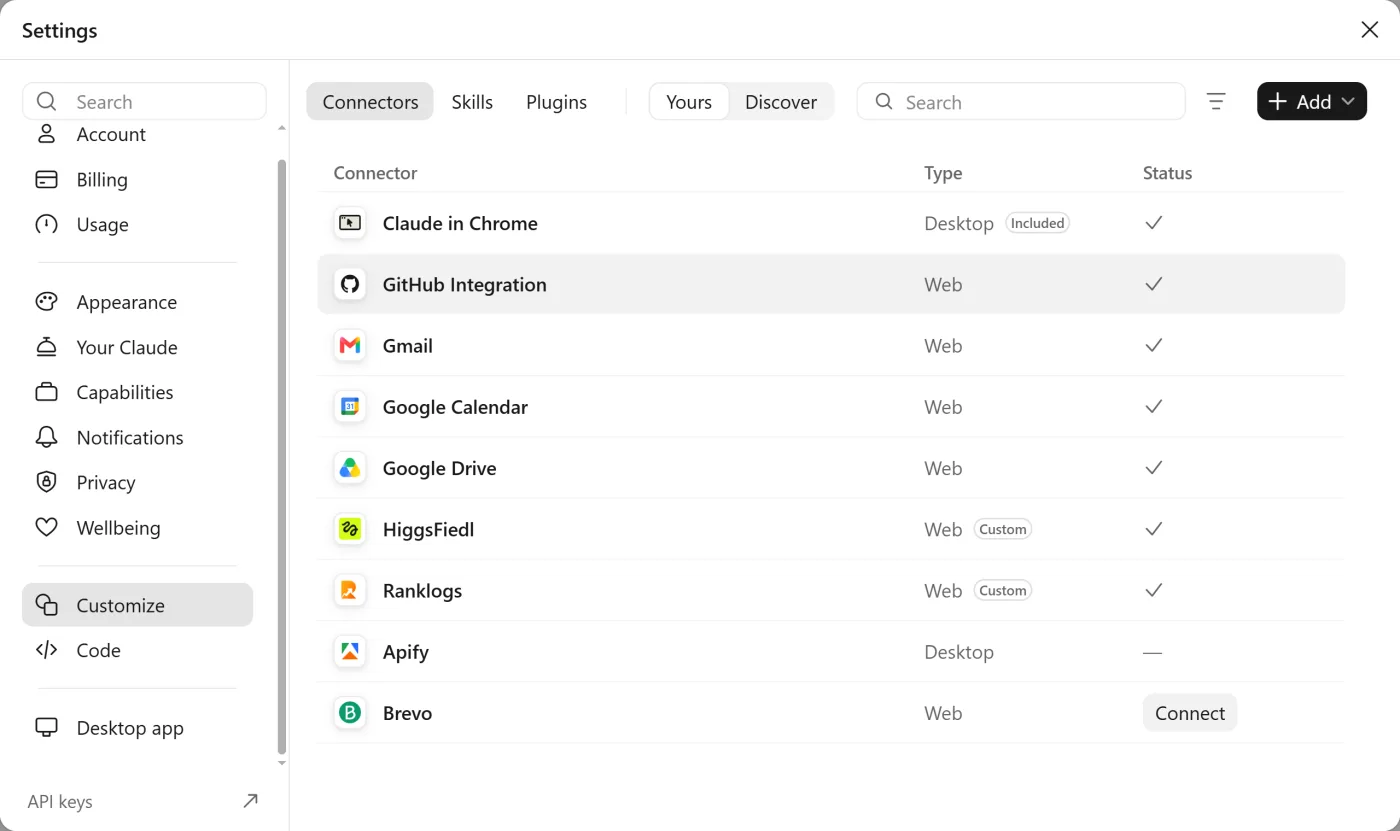
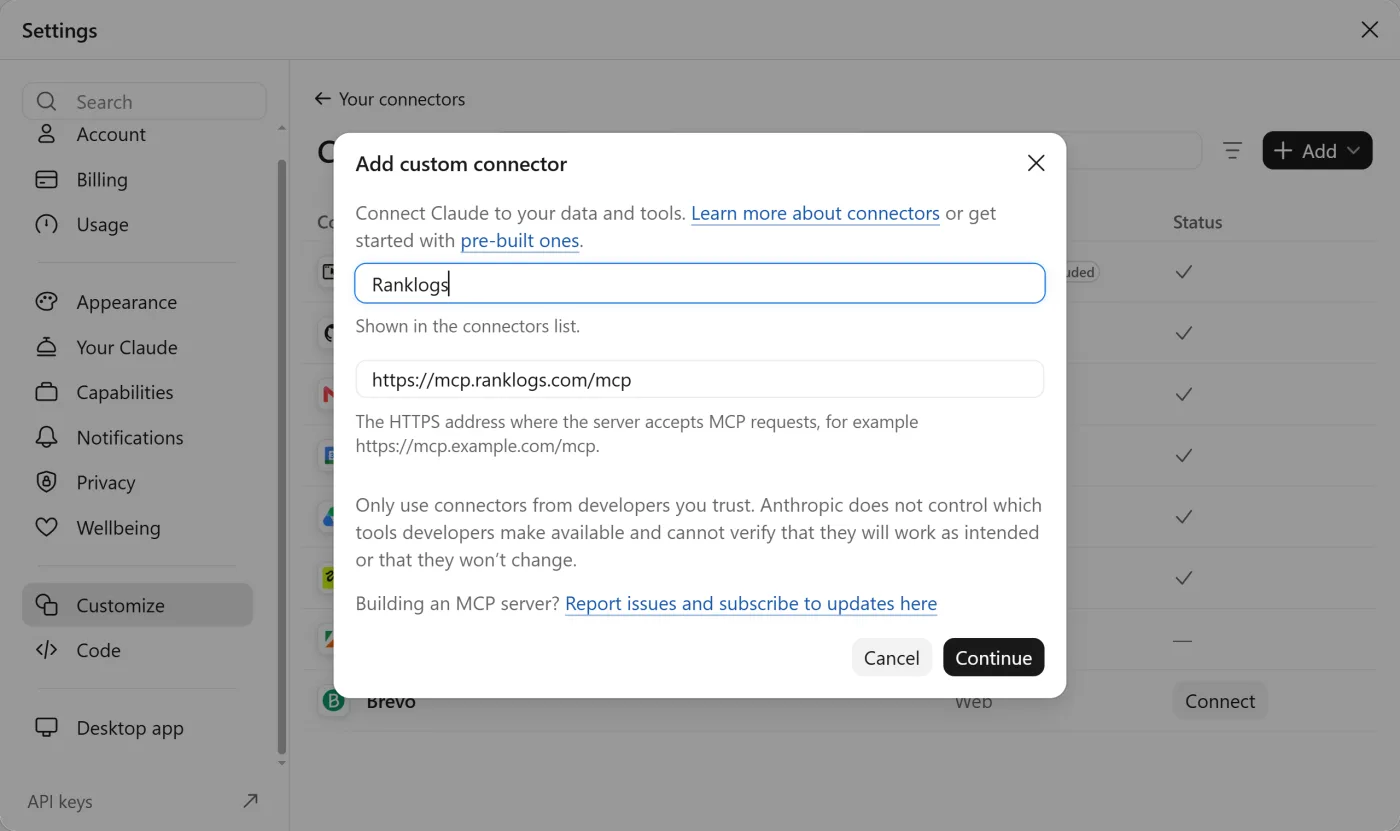
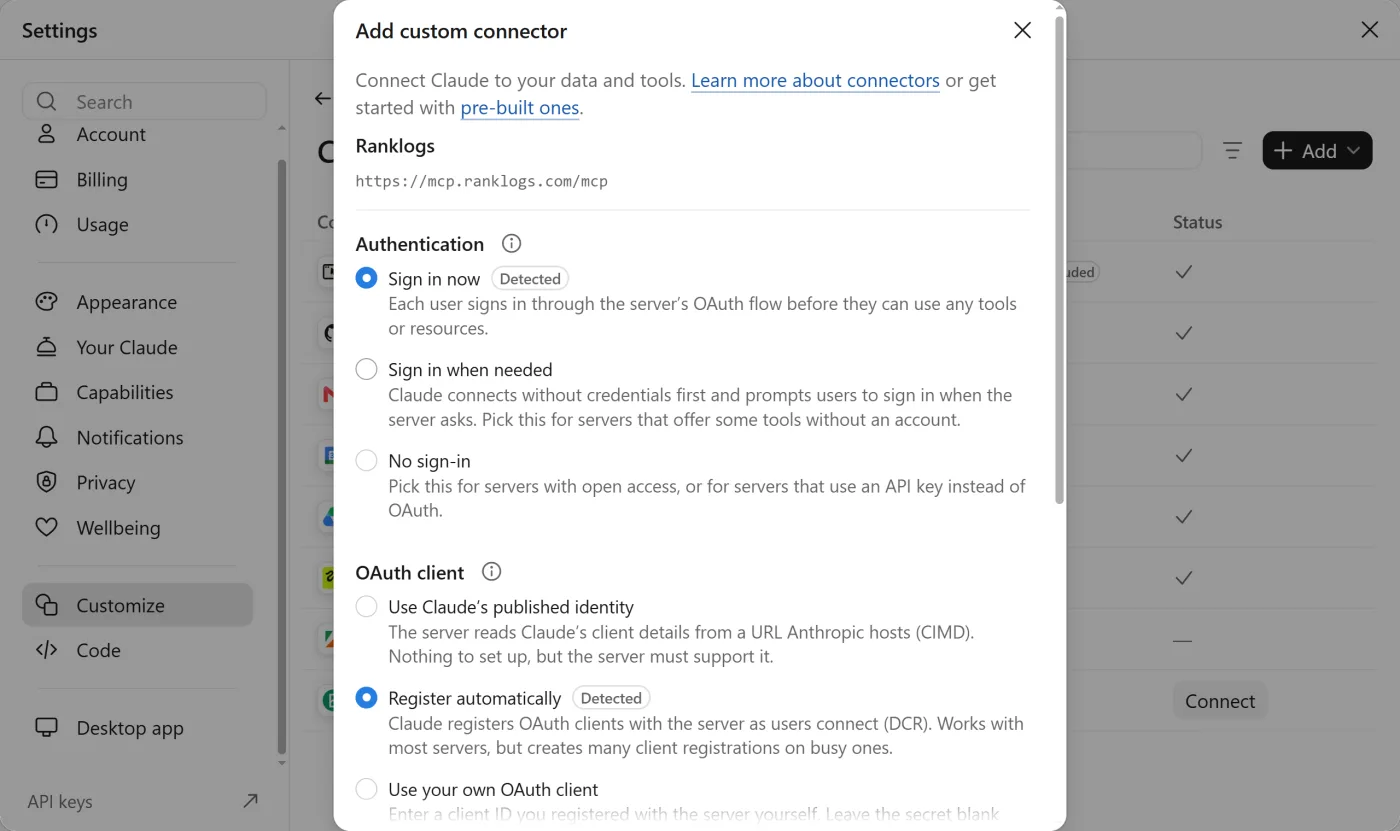
In Claude, open Settings, then Customize, then Connectors. Click + Add and choose Add custom connector. Enter Ranklogs as the name and https://mcp.ranklogs.com/mcp as the MCP server URL, click Continue, and keep the detected sign-in options (Sign in now, Register automatically). Then sign in with your Ranklogs account, choose an access level and approve. It takes about two minutes.
Run: claude mcp add --transport http ranklogs https://mcp.ranklogs.com/mcp. Then type /mcp inside Claude Code, choose ranklogs and sign in with your Ranklogs account in the browser window that opens.
Claude (claude.ai custom connectors, Claude Desktop and Claude Code), ChatGPT via Developer Mode, and any MCP-compatible client such as Cursor. The connector URL is https://mcp.ranklogs.com/mcp for all of them.
Yes, via ChatGPT's Developer Mode (Settings, Connectors, Advanced). ChatGPT's standard connector flow only calls generic search and fetch, so it will not see Ranklogs' named tools; Developer Mode is required.
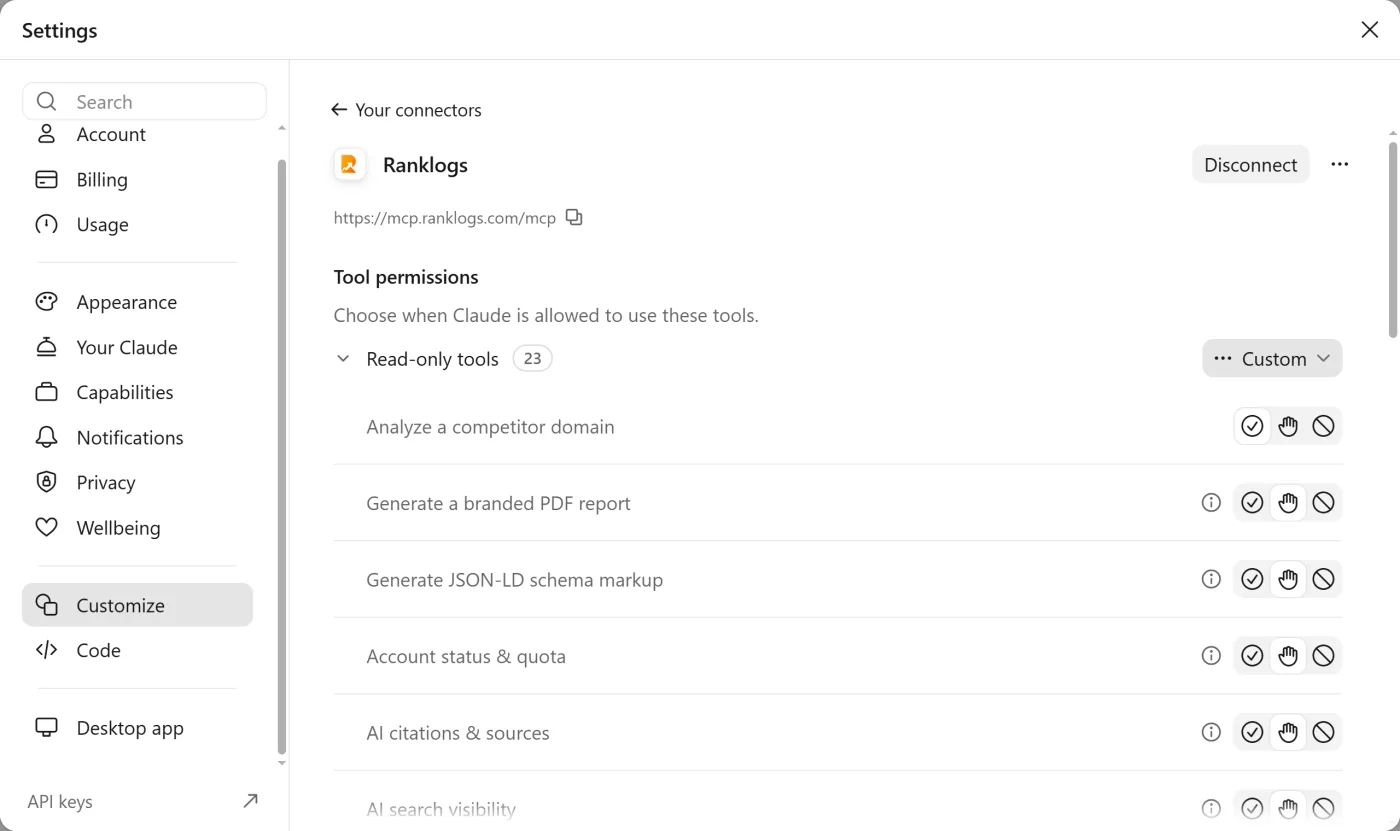
You choose the access level when you approve the connection. Read only lets the AI look at your data with 23 tools. Read and write also allows the four tools that act: adding keywords to a project, adding an AI prompt to track, generating a content brief and running a Win this prompt analysis. You can reconnect with a different level at any time.
Yes. Ranklogs MCP is included with every Ranklogs account, including the free trial. There is no separate add-on: tool usage counts against your plan's normal limits, the same as using the dashboard.
Only if you allow it. 23 of the 27 tools are read-only. The four that act need a Read and write connection, and each counts against your plan's normal limits. Generating a content brief or running Win this prompt uses one of your plan's monthly content analyses.
You sign in with your own Ranklogs account over OAuth 2.1, the AI app never sees your password, the server only reads that account's data, and you can revoke access at any time. API-key access is available for clients that don't support OAuth.
27 tools across eight areas: account and projects, rank tracking, keyword research, site audit, backlinks, competitor research and AI-search visibility, content optimization, plus report and schema generation. 23 are read-only; the other four act inside your plan's limits.
Every Ranklogs plan includes the MCP server, including the free trial. Connect it to Claude in about two minutes.